
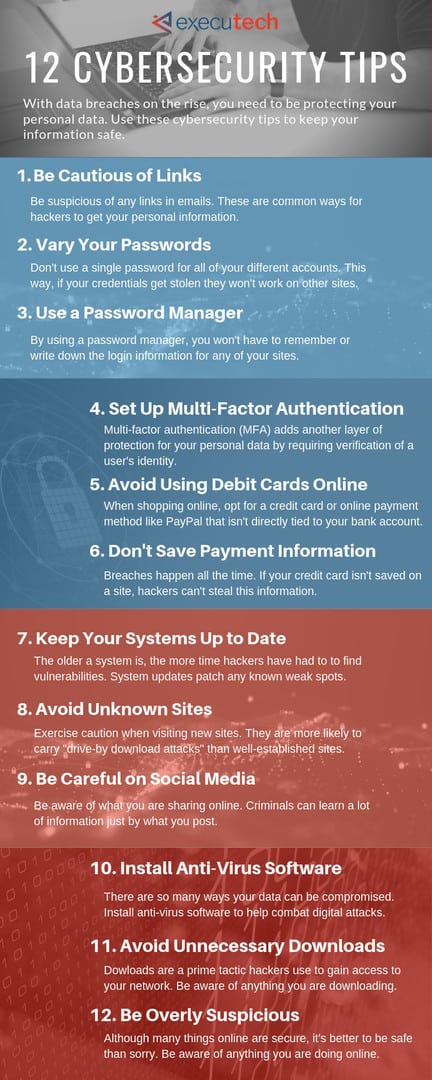
Cybersecurity Tips for Protecting Personal Data Online: Your Ultimate Guide
In our increasingly interconnected world, safeguarding your digital life is no longer an option but a necessity. As a professional SEO expert and content writer, I understand the critical importance of secure online practices. This comprehensive guide provides essential cybersecurity tips for protecting personal data online, empowering you to navigate the digital landscape with confidence. From mastering secure passwords to understanding the nuances of online privacy, we’ll delve into actionable strategies that shield your sensitive information from the ever-present threats of the internet. Prepare to fortify your digital defenses and reclaim control over your valuable personal data.
The Evolving Threat Landscape: Why Cybersecurity Matters More Than Ever
The digital realm, while offering unparalleled convenience and connectivity, is also a fertile ground for sophisticated threats. Every click, every login, and every piece of information shared online creates a digital footprint that, if unprotected, can become a target. We're living in an era where data breaches are reported almost daily, exposing millions of records to malicious actors. From financial details to personal communications, your entire digital identity is at stake. The rise of advanced persistent threats, ransomware, and highly convincing phishing attacks means that a passive approach to digital security is simply inadequate. Understanding these evolving risks is the first step toward implementing robust protective measures for your personal data.
Understanding the Stakes: What Happens When Your Data is Compromised?
- Identity Theft: Malicious actors can use your exposed information (Social Security numbers, birth dates, addresses) to open fraudulent accounts, file fake tax returns, or even commit crimes in your name.
- Financial Fraud: Stolen credit card numbers, bank account details, or login credentials can lead to unauthorized transactions, draining your accounts or racking up debt.
- Reputational Damage: Compromised email or social media accounts can be used to send spam, spread misinformation, or impersonate you, harming your personal and professional standing.
- Loss of Privacy: Sensitive personal conversations, health information, or private photos can be exposed, leading to blackmail or emotional distress.
- Malware and Ransomware: Unsecured systems can become entry points for malicious software that locks your files or spies on your activities, demanding payment for their release.
Foundational Pillars of Online Data Protection
Building a strong defense starts with establishing fundamental practices that form the bedrock of your digital security. These are the non-negotiable steps everyone must take to effectively protect their personal information.
Strong, Unique Passwords: Your First Line of Defense
The humble password remains your primary gatekeeper. Yet, many individuals still rely on weak, easily guessable combinations or reuse the same password across multiple services. This is akin to using the same key for your house, car, and office – one compromise opens everything. To truly protect your personal data online, every account needs a unique, complex password.
- Length and Complexity: Aim for at least 12-16 characters. Combine uppercase and lowercase letters, numbers, and special symbols. Avoid easily identifiable information like birthdays, pet names, or common words.
- Password Managers: This is a game-changer for creating, storing, and managing complex passwords. Tools like LastPass, 1Password, or Bitwarden generate strong, random passwords for each site and securely remember them for you. This eliminates the need to recall dozens of intricate combinations, making secure passwords effortless. Consider exploring our guide on choosing the best password manager.
- Avoid Reuse: Never, under any circumstances, reuse passwords across different platforms. If one service suffers a data breach, hackers will immediately try those credentials on other popular sites.
Embracing Multi-Factor Authentication (MFA)
Even the strongest password can be compromised. That's where multi-factor authentication (MFA) steps in, adding an indispensable second (or third) layer of security. MFA requires you to verify your identity using two or more distinct methods before granting access to an account. This typically involves something you know (your password) and something you have (your phone or a physical token) or something you are (a fingerprint).
Most major online services, from email providers to banking apps, offer MFA. Enable it wherever possible. Common MFA methods include:
- SMS Codes: A code sent to your registered phone number. While convenient, this is less secure than other methods due to SIM-swapping risks.
- Authenticator Apps: Apps like Google Authenticator or Authy generate time-based one-time passwords (TOTP) that refresh every 30-60 seconds. These are generally more secure than SMS codes.
- Biometrics: Fingerprint scans or facial recognition (Face ID) on your smartphone provide a quick and secure authentication method.
- Physical Security Keys: Hardware devices like YubiKey offer the highest level of security, requiring physical presence to authenticate.
Vigilance Against Phishing and Social Engineering
Human error remains a significant vulnerability. Phishing attacks and other forms of social engineering manipulate individuals into divulging sensitive information or performing actions that compromise their security. These attacks are becoming increasingly sophisticated, often mimicking legitimate communications from banks, government agencies, or well-known companies.
To defend against these deceptive tactics:
- Scrutinize Emails and Messages: Always check the sender's email address for inconsistencies. Hover over links (don't click!) to see the true destination URL. Look for grammatical errors, generic greetings, or urgent, threatening language.
- Verify Requests: If an email or message asks for personal information, warns of account suspension, or urges immediate action, verify the request directly with the organization through an official channel (e.g., call their customer service number listed on their official website, not one provided in the suspicious email).
- Be Wary of Attachments: Never open unexpected attachments, especially from unknown senders. They often contain malware protection-bypassing viruses or ransomware.
- Educate Yourself: Stay informed about the latest phishing trends and common social engineering ploys.
Advanced Strategies for Enhanced Digital Security
Beyond the basics, several advanced measures can significantly bolster your cybersecurity for protecting personal data online, offering layers of defense against more persistent threats.
The Power of Encryption and VPNs
Encryption is the process of converting information into a code to prevent unauthorized access. When data is encrypted, it's unreadable to anyone without the correct decryption key. A Virtual Private Network (VPN) extends this concept to your internet connection, creating a secure, encrypted tunnel for your online traffic.
- Why Use a VPN? When you connect to public Wi-Fi (e.g., at a coffee shop or airport), your data is vulnerable to eavesdropping. A VPN encrypts your connection, making it nearly impossible for others on the same network to intercept your information. It also masks your IP address, enhancing your online privacy and making it harder for websites and advertisers to track your location and browsing habits.
- End-to-End Encryption: Utilize messaging apps and communication platforms that offer end-to-end encryption (e2ee) for your conversations. This ensures that only the sender and intended recipient can read the messages.
- Encrypt Your Devices: Enable full disk encryption on your laptops and smartphones. Most modern operating systems (Windows BitLocker, macOS FileVault, Android/iOS encryption) offer this feature, protecting your data if your device is lost or stolen.
Regular Software Updates: Patching Vulnerabilities
Software vulnerabilities are like open windows in your digital home. Developers constantly release updates and patches to fix security flaws that hackers could exploit. Ignoring these updates leaves your systems exposed to known threats. Always keep your operating system (Windows, macOS, Linux, iOS, Android), web browsers, antivirus software, and all applications up to date.
Enable automatic updates whenever possible, or make it a routine to check for updates manually. This proactive approach is a cornerstone of effective malware protection and overall digital security.
Smart Browsing Habits and Privacy Settings
Your web browser is your gateway to the internet, and how you configure it significantly impacts your online privacy. Default settings often prioritize convenience over security.
- Browser Privacy Settings: Dive into your browser's privacy and security settings. Block third-party cookies, which are often used for tracking across websites. Consider using privacy-focused browsers like Brave or Firefox, or extensions like uBlock Origin to block ads and trackers.
- "Do Not Track" Requests: While not universally honored, enabling "Do Not Track" sends a signal to websites that you prefer not to be tracked.
- HTTPS Everywhere: Ensure you're always browsing on sites with "HTTPS" in their URL. This indicates a secure, encrypted connection between your browser and the website. Most modern browsers automatically warn you about insecure "HTTP" sites.
- Incognito/Private Browsing: Understand that these modes only prevent your browser from storing your local browsing history, cookies, and site data. They do not make you anonymous online or prevent your ISP or employer from seeing your activity.
Data Backup and Recovery Planning
Even with the best cybersecurity measures, data loss can occur due to hardware failure, accidental deletion, or a successful cyberattack (like ransomware). Regular data backups are your ultimate safety net for protecting your personal data online.
Implement a "3-2-1" backup strategy:
- 3 Copies of Your Data: Original + 2 backups.
- 2 Different Media Types: E.g., external hard drive and cloud storage.
- 1 Offsite Copy: Store one backup physically separate from your primary location (e.g., cloud backup or a drive at a friend's house).
Regularly test your backups to ensure they are recoverable. This foresight can prevent significant distress and data loss should the worst occur.
Proactive Measures to Safeguard Your Digital Footprint
Protecting your personal data extends beyond technical safeguards. It also involves being mindful of your digital presence and the information you voluntarily share.
Mind Your Digital Footprint and Information Sharing
Every piece of information you post, share, or interact with online contributes to your digital footprint. Oversharing on social media, participating in online quizzes, or even commenting on public forums can inadvertently reveal details that attackers can piece together for targeted attacks or identity theft.
- Review Social Media Privacy Settings: Regularly audit your privacy settings on platforms like Facebook, Instagram, and LinkedIn. Limit who can see your posts, photos, and personal information. Be cautious about accepting friend requests from strangers.
- Think Before You Post: Avoid sharing sensitive personal details like your full birthdate, home address, travel plans, or financial information. Even seemingly innocuous details can be used for social engineering.
- Professional Networks: Be mindful of the information you put on professional sites. While good for networking, too much detail can be exploited.
Monitoring for Identity Theft and Data Breaches
Despite your best efforts, your data might still be exposed due to a third-party data breach. Proactive monitoring can help you detect and respond quickly to potential identity theft.
- Credit Monitoring: Regularly check your credit reports from the three major bureaus (Equifax, Experian, TransUnion) for suspicious activity. You are entitled to a free report annually from each.
- Dark Web Monitoring: Services like Have I Been Pwned? allow you to check if your email address has appeared in known data breaches. Some identity protection services also offer continuous dark web monitoring, alerting you if your credentials appear for sale.
- Review Account Statements: Scrutinize your bank, credit card, and utility statements for any unauthorized transactions.
Understanding and Managing App Permissions
Mobile applications often request extensive permissions, sometimes beyond what's necessary for their functionality. Granting unrestricted access to your camera, microphone, contacts, location, or storage can compromise your online privacy and expose sensitive data.
Periodically review the permissions granted to apps on your smartphone and tablet. On iOS (Settings > Privacy) and Android (Settings > Apps > App permissions), you can see and revoke permissions. Only grant permissions that are absolutely essential for the app to function. For example, a flashlight app doesn't need access to your contacts or location.
Frequently Asked Questions About Online Data Protection
What is the most critical cybersecurity tip for personal data?
While many tips are crucial, enabling multi-factor authentication (MFA) on all your accounts is arguably the single most critical step you can take. Even if your password is compromised in a data breach or a successful phishing attack, MFA acts as a robust second barrier, making it significantly harder for unauthorized individuals to access your accounts. It's an indispensable layer of digital security for protecting your personal data online.
How often should I change my passwords?
The traditional advice of changing passwords every 90 days has evolved. Instead of arbitrary changes, focus on creating truly secure passwords that are long, complex, and unique for each account. Use a reliable password manager to achieve this. If you are using unique, strong passwords and have MFA enabled, frequent password changes are less critical, unless there's a specific reason, such as a suspected account compromise or a service notifying you of a data breach. Focus on password hygiene over forced rotations.
Is using a free VPN safe for protecting personal data?
While some free VPN services may appear appealing, many come with significant risks to your online privacy. Free VPNs often rely on advertising, sell user data, or have weaker encryption standards. Some may even inject malware or track your browsing activity. For truly reliable cybersecurity for protecting personal data online, it is highly recommended to invest in a reputable, paid VPN service. Paid VPNs typically offer stronger encryption, faster speeds, no data logging, and better customer support, providing genuine peace of mind.
What are the signs of a potential phishing attack?
Common signs of a phishing attack include unexpected emails or messages, generic greetings instead of your name, urgent or threatening language (e.g., "Your account will be suspended!"), suspicious sender email addresses (mismatched domains), grammatical errors or typos, and links that, when hovered over, point to unfamiliar URLs. Always be suspicious of requests for sensitive information or demands for immediate action, and verify the legitimacy of the communication through official channels.
How can I check if my data has been part of a data breach?
You can check if your email address or other personal information has been exposed in a known data breach by visiting reputable websites like Have I Been Pwned? (https://haveibeenpwned.com/). Simply enter your email address, and the site will tell you if it's appeared in any publicly disclosed breaches. Additionally, consider signing up for identity theft protection services that offer dark web monitoring, which continuously scans for your personal data on illicit marketplaces and alerts you to potential exposure.

0 Komentar