
Revolutionizing Technical Support: The Power of Augmented Reality Remote Assistance
In an era defined by rapid technological advancement and the imperative for operational resilience, the landscape of technical support is undergoing a profound transformation. At the forefront of this revolution stands augmented reality remote assistance, a groundbreaking solution that is redefining how businesses deliver expert guidance, troubleshoot complex issues, and ensure seamless operations globally. This innovative application of AR technology bridges geographical divides, empowering field technicians and frontline workers with real-time, hands-free support from remote experts. It's more than just a tool; it's a strategic imperative for organizations aiming to enhance efficiency, reduce costs, and elevate customer satisfaction in an increasingly complex industrial world. Dive in to discover how AR remote assistance is not just a futuristic concept, but a tangible, impactful solution available today.
Understanding Augmented Reality Remote Assistance for Technical Support
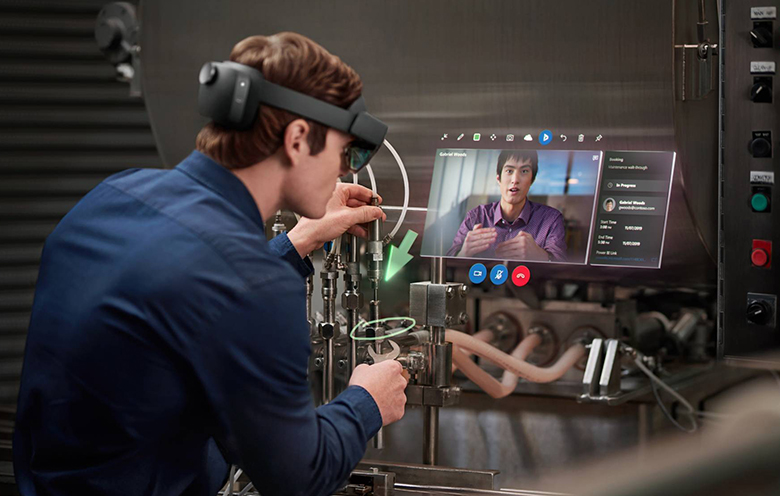
At its core, augmented reality remote assistance for technical support leverages AR technology to overlay digital information, annotations, and 3D models onto a user's real-world view. This is typically achieved through smart glasses, tablets, or smartphones, allowing a remote expert to see what the on-site technician sees in real-time. The expert can then provide visual cues, draw on the technician's field of view, share documents, or even project intricate instructions directly onto equipment, guiding the technician step-by-step through complex procedures or troubleshooting. This seamless, interactive collaboration fundamentally changes the dynamic of traditional technical support, moving from verbal instructions to immersive, visual guidance.
The immediate benefit is the ability to bring specialized knowledge directly to the point of need, regardless of the expert's physical location. This capability is particularly crucial for industries dealing with intricate machinery, specialized processes, or critical infrastructure where downtime is costly and errors can be catastrophic. From manufacturing floors and energy plants to healthcare facilities and logistics hubs, AR-powered support minimizes the need for expert travel, accelerating problem resolution and significantly boosting operational efficiency. It's about enabling a virtual expert to be virtually present, offering invaluable remote guidance and ensuring tasks are completed correctly and safely the first time.
The Transformative Impact on Technical Support Operations
The adoption of augmented reality remote assistance brings a multitude of strategic advantages that directly impact an organization's bottom line and competitive standing. These benefits extend far beyond simple communication, fostering a more resilient, efficient, and knowledgeable workforce.
Reduced Downtime and Operational Costs
- Accelerated Problem Resolution: By enabling immediate access to expert assistance, AR remote support drastically cuts down troubleshooting time. Technicians can resolve issues faster, leading to significant reductions in equipment downtime, which directly translates to cost savings and increased productivity.
- Minimized Travel Expenses: The ability for experts to provide support remotely eliminates the need for expensive and time-consuming travel to distant sites. This reduction in travel costs for specialists, often a major expenditure in field service management, can free up substantial budget for other critical initiatives.
- Optimized Resource Allocation: With experts able to assist multiple sites remotely, companies can optimize the deployment of their most skilled personnel, ensuring their expertise is utilized where it's most needed, without physical constraints.
Enhanced First-Time Fix Rates and Service Quality
- Precision Guidance: Visual overlays and real-time annotations leave little room for misinterpretation. Experts can highlight specific components, illustrate correct tool usage, and guide technicians with unprecedented precision, leading to higher first-time fix rates.
- Consistent Service Delivery: AR ensures that standardized procedures and best practices are followed consistently across all operations, regardless of the individual technician's experience level, thereby elevating overall service quality.
- Proactive Troubleshooting: With better diagnostic tools and real-time expert input, technicians can often identify and address nascent issues before they escalate, moving towards a more predictive maintenance model.
Improved Knowledge Transfer and Workforce Empowerment
- On-the-Job Training: AR remote assistance acts as a powerful training tool. Junior technicians gain hands-on experience under the direct, visual guidance of seasoned experts, accelerating skill development and competency building. This practical, immersive training is far more effective than traditional methods.
- Democratizing Expertise: Specialized knowledge, often concentrated in a few senior personnel, becomes accessible to a broader workforce. This knowledge sharing mechanism empowers less experienced technicians to handle complex tasks, reducing reliance on a limited pool of experts.
- Increased Technician Confidence: Knowing that expert help is just a call away instills greater confidence in frontline workers, enabling them to tackle challenging tasks more independently and effectively. This also contributes to higher job satisfaction and retention.
Global Reach, Local Expertise
In today's interconnected world, businesses operate across diverse geographies. Augmented reality remote assistance breaks down geographical barriers, allowing a single expert based anywhere in the world to provide critical support to a technician on the other side of the globe. This ensures that expert assistance is available 24/7, irrespective of time zones or physical distance, making it a cornerstone for global operational efficiency and truly enabling global virtual collaboration.
Key Features of Advanced AR Remote Assistance Solutions
Modern AR remote assistance platforms are packed with features designed to maximize the effectiveness of remote support and enhance the user experience for both experts and technicians.
- Live Video Streaming and Annotations: High-definition video feeds allow experts to see precisely what the technician sees. Real-time digital annotations, such as arrows, circles, and text, can be drawn directly onto the live video feed, guiding the technician's gaze and actions.
- 3D Object Overlay and Digital Twins: Some advanced solutions allow experts to overlay 3D models or digital twins of equipment onto the technician's view. This provides a detailed, interactive blueprint for complex assembly, maintenance, or repair tasks.
- Workflow Guidance and Checklists: Experts can push interactive checklists, step-by-step instructions, and multimedia content (images, videos, PDFs) directly to the technician's AR device, ensuring adherence to standard operating procedures.
- Data Integration and Analytics: Integration with enterprise systems (e.g., ERP, CRM, IoT platforms) allows experts to access relevant asset data, service history, and real-time sensor readings. Post-session analytics provide insights into resolution times, common issues, and expert utilization, aiding continuous improvement.
- Voice Commands and Hands-Free Operation: For technicians working in hazardous environments or needing both hands free, voice-activated controls and gestures are crucial, enhancing worker safety and efficiency.
- Session Recording and Playback: Recording support sessions provides valuable training material, compliance documentation, and a record for future reference, facilitating ongoing knowledge management.
Implementing AR Remote Assistance: A Strategic Approach
Successfully integrating augmented reality remote assistance for technical support requires more than just purchasing software; it demands a strategic, phased approach to ensure maximum return on investment and seamless adoption.
- Assess Your Needs and Identify Use Cases:
- Identify Pain Points: Where are your biggest challenges in technical support? High travel costs, long resolution times, lack of expert availability, or training bottlenecks?
- Pilot Opportunities: Start with specific, high-impact use cases. Perhaps a particular type of equipment that frequently breaks down, or a remote site that is costly to reach.
- Stakeholder Buy-in: Engage key stakeholders from IT, operations, field service, and management early in the process to build consensus and support.
- Choose the Right Platform and Hardware:
- Evaluate Features: Match platform features (e.g., 3D annotation, data integration, security) to your specific use cases.
- Hardware Compatibility: Determine whether smart glasses, tablets, or smartphones are best suited for your environment and technician workflows. Consider ruggedness, battery life, and ease of use.
- Scalability and Integration: Ensure the chosen solution can scale with your organization's growth and integrate with existing enterprise systems (ERP, CMMS).
- Pilot Programs and Phased Rollout:
- Start Small: Implement a pilot program with a select group of technicians and experts. Gather feedback and refine processes.
- Measure Success: Define clear KPIs for your pilot (e.g., first-time fix rate improvement, travel cost reduction, resolution time decrease) to demonstrate value.
- Iterate and Expand: Use insights from the pilot to refine your implementation strategy before a broader rollout.
- Training and Change Management:
- Comprehensive Training: Provide thorough training for both technicians and remote experts on using the AR platform and devices. Focus on practical scenarios.
- Address Resistance: Proactively address any resistance to new technology by highlighting the benefits for individual users and the organization. Showcase success stories from the pilot.
- Continuous Support: Establish a clear support channel for users to ask questions and report issues. Foster a culture of continuous learning and adaptation.
Overcoming Challenges in Adoption
While the benefits of AR remote assistance are compelling, organizations may encounter challenges during adoption. Being prepared for these can smooth the transition:
- Connectivity Issues: Ensure reliable internet connectivity in field environments. Solutions often offer offline capabilities or optimize data usage for low-bandwidth scenarios.
- Hardware Management: Managing devices (charging, updates, repairs) can be a logistical challenge. Choose robust devices and establish clear management protocols.
- User Acceptance: Some technicians may initially resist new technology. Comprehensive training, demonstrating ease of use, and showcasing tangible benefits are crucial for encouraging adoption.
- Data Security and Privacy: Transmitting live video and sensitive data requires robust security protocols. Ensure your chosen solution adheres to industry-specific compliance standards.
The Future Outlook: Beyond Basic Support
The trajectory of augmented reality remote assistance for technical support is upward, with continuous innovation pushing the boundaries of what's possible. We can expect deeper integration with artificial intelligence for predictive maintenance, where AI analyzes sensor data and proactively suggests solutions or alerts experts to potential issues before they cause downtime. The evolution of digital twin technology will allow for even more precise virtual interventions and simulations. Furthermore, the convergence with the industrial metaverse could create truly immersive and collaborative environments for complex problem-solving, transcending current limitations and fostering unprecedented levels of operational efficiency and safety. The future of expert assistance is undoubtedly augmented, intelligent, and globally connected.
Frequently Asked Questions
What is the primary benefit of using augmented reality for remote technical support?
The primary benefit of augmented reality remote assistance for technical support is the ability to provide real-time, visual, and interactive guidance to on-site technicians from a remote expert. This significantly reduces downtime, minimizes travel costs, increases first-time fix rates, and enhances overall operational efficiency. It essentially brings the expert's eyes and hands to the problem, no matter the geographical distance, revolutionizing field service management.
How does AR remote assistance improve first-time fix rates?
AR remote assistance improves first-time fix rates by enabling remote experts to provide precise, visual instructions directly overlaid onto the technician's view of the equipment. This eliminates ambiguity often associated with verbal instructions, ensuring that technicians perform tasks correctly the first time. The visual guidance, coupled with access to digital resources and workflow checklists, empowers technicians to diagnose and resolve issues with greater accuracy and confidence, leading to a substantial increase in operational efficiency.
What industries benefit most from augmented reality remote assistance?
While beneficial across many sectors, industries that benefit most from augmented reality remote assistance for technical support include manufacturing, energy and utilities, telecommunications, healthcare, logistics, and heavy equipment maintenance. These sectors often deal with complex machinery, critical infrastructure, geographically dispersed assets, and a high cost associated with downtime or expert travel. The need for precise troubleshooting, rapid resolution, and expert knowledge sharing makes AR an invaluable tool for these industries, transforming their approach to industrial maintenance and support.
Is specialized hardware always required for AR remote assistance?
While dedicated smart glasses offer the most immersive and hands-free experience for augmented reality remote assistance, specialized hardware is not always strictly required. Many AR remote assistance solutions are also compatible with standard smartphones and tablets, leveraging their cameras and screens to provide augmented views. However, for technicians needing full use of their hands or working in challenging environments, purpose-built AR smart glasses (often ruggedized and with integrated cameras) provide a superior and safer experience, crucial for tasks requiring precision and focus.
How does AR remote assistance contribute to knowledge transfer and training?
Augmented reality remote assistance significantly contributes to knowledge transfer and training by enabling on-the-job learning. Junior technicians can work alongside remote senior experts, receiving real-time, visual guidance and direct mentorship. This immersive experience accelerates skill development far beyond traditional classroom settings. Furthermore, AR sessions can be recorded and archived, creating a valuable library of practical troubleshooting guides and best practices that can be used for future training modules and continuous knowledge sharing across the workforce, fostering a culture of continuous improvement and workforce empowerment.

0 Komentar